EPUB Reader for all books
- 4.2
- Rating
- 5.00M
- Installs
- Free
- Price
 Analysis by App-foxy
I spend a lot of time reading on a phone, so I look for an ebook reader that stays out of the way rather than trying to turn reading into a social platform. EPUB Reader from Librera fits that preference well. It is a free Books & Reference app for Android, aimed at people who already have digital books and want a practical place to open, organize, and read them.
My first impression is that this is a reader for people who care more about control than decoration. The app’s appeal is not simply that it opens EPUB files. It gives the reading experience enough room to adapt to different books, screens, and habits, while still feeling like a tool I can pick up without paying for a subscription. Its current version is 9.3.79, and the project has been available since February 14, 2019, which gives it a more established feel than a brand-new reading utility.
My short recommendation is simple: if you keep your own EPUB collection and want a flexible Android reader, this is worth trying. If you want a polished bookstore ecosystem, automatic purchases, or a tightly managed reading service, I would look elsewhere.
You May Also Like

 Blood Strike: 2.5 Anniversary
Blood Strike’s Loadouts Turn Every Drop Into a Tactical Gamble
A close look at Blood Strike’s custom loadouts: how fast access to signature weapons reshapes its battle royale rhythm, rewards preparation, and narrows the gap between fights.

 Pandora - Music & Podcasts
Pandora’s Music Is Easy to Start, but Harder to Recover
Pandora’s strength is its low-effort path from a seed to a station. Its weak spot is how much confidence it asks you to place in connection, setup, and quiet recovery.

 8 Ball Pool
 Is Built on Rivalries, Rematches, and Routine
A close look at the rivalries, rematches, shared routines, and unanswered safety questions that turn a quick pool match into a persistent mobile community.

 Samsung Music
’s Quiet Strength Is Playing What You Already Own
Its reach comes less from spectacle than from dependable access to a personal library. That simplicity is both the app’s strongest retention engine and its ceiling.

 AccuWeather: Weather Radar
AccuWeather Review: A Quick, Clear Forecast for Everyday Decisions
For everyday plans, the best forecast is the one you can understand quickly. AccuWeather makes rain timing, radar, and local conditions easy to act on, with a few trade-offs.

 Hill Climb Racing
Why Hill Climb Racing Still Turns Crashes Into One More Run
A tiny car, a bumpy hill and one more upgrade: Hill Climb Racing keeps resurfacing because its simple chaos makes every near-miss feel personal.
More From Our News Desk



How EPUB Reader feels in everyday use
I find EPUB Reader most useful when a phone is passed around for practical reading, such as keeping a few shared household books or reference files in one place. That arrangement works best when everyone knows which files are personal and which are meant for common use; the next section looks at setting those boundaries without assuming the app provides separate household profiles.
A useful home for books you already own
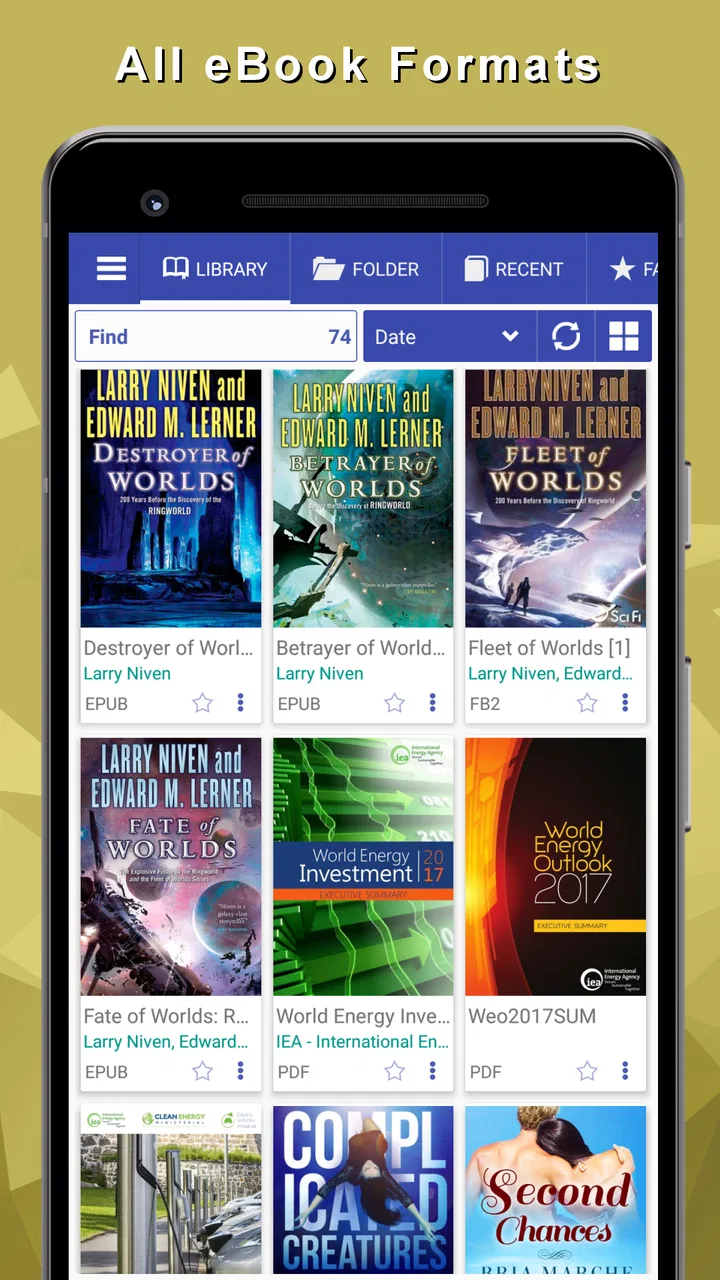
The strongest use case is straightforward: you have books stored on your device and want to read them without being pushed toward a particular store. That makes the app especially practical for public-domain books, documents received from a study group, manuals, independent publications, and personal files collected over time.
I like this approach because it separates reading from buying. Many mainstream alternatives are built around a store first and a reader second. They make sense if your library lives inside one company’s account, but they can feel restrictive when your files come from several places. Librera’s identity is closer to a personal bookshelf, where the source of a book matters less than whether the file is available to open.
That flexibility also means the initial experience depends on how tidy your collection is. A large folder full of vaguely named files can become difficult to browse, no matter how capable the reader itself may be. I would spend a few minutes giving books clear filenames and arranging them into sensible folders before importing a large collection. That small preparation makes the app much more pleasant later.
Reading on a small screen
On a phone, the important test is not how attractive the library looks. It is whether I can read for half an hour without constantly fighting the interface. EPUB Reader is at its best when I adjust the display to match the book and the environment rather than accepting a single default layout.
That matters because EPUB files are not all prepared in the same way. One may have comfortable chapter breaks and clean typography, while another may contain awkward spacing, oversized headings, or inconsistent styling. A reader that lets me compensate for those differences is more useful than one that looks perfect only with professionally formatted titles.
I also find this kind of control valuable when switching between a phone and a larger Android screen. A layout that feels comfortable on a compact display can look unnecessarily loose on a tablet, while a setting that works in daylight may be too bright at night. The best experience comes from treating the display controls as part of the reading workflow, not as options I configure once and forget.
Where it fits among familiar alternatives
Compared with a dedicated bookstore app, Librera is less convenient for buying and syncing books inside one commercial catalog. A Kindle-style service is usually the easier choice for readers who want purchases, account-based library management, and a consistent experience across supported devices. A subscription reading service is better if discovery and access to a rotating catalog matter more than owning or managing individual files.
Compared with a basic file viewer, however, EPUB Reader is the more appropriate tool for sustained reading. A file manager can open a document, but it is not designed around returning to books, adjusting pages, and building a usable personal collection. Librera occupies the middle ground: more focused than a generic viewer, but less tied to a particular store than many famous ebook platforms.
That trade-off is important. I would not choose it because it promises the smoothest possible path from purchase to reading. I would choose it because I want my own files to remain useful even when they come from different sources.
What the current version means for readers
The current release, 9.3.79, is the version I would evaluate before deciding whether the app suits me. Its presence suggests an actively maintained product rather than an abandoned reader left unchanged after its original launch. Still, a version number by itself is not a reason to expect a particular feature or a dramatic redesign. I treat it as evidence of ongoing development, not as a promise about what will arrive next.
The app’s age rating is Everyone, which matches its role as a general reading utility rather than an entertainment product built around mature themes. It also requires Android 7.0 or later, so people using older phones should check compatibility before planning a large migration. For most recent Android devices, that requirement should not be the main obstacle, but it is relevant if you are keeping an older handset alive as a dedicated reader.
Librera is listed as the developer, and the app has reached over five million installs with an average rating of 4.2 from around thirty thousand ratings. Those figures do not prove that every reader will like its interface, but they do tell me that it has found a substantial audience beyond a tiny enthusiast niche.
Changes and the effect on existing users
When an app has been around since February 14, 2019 and is now at version 9.3.79, existing users are likely to value continuity as much as new features. A long-running reader becomes part of a personal routine: books are added over time, reading positions matter, and familiar display settings reduce friction. For that reason, I judge product evolution by whether it improves daily reading without making the library feel unfamiliar.
The practical lesson for current users is to update with a little care. Before making a major change to how you store books, I would keep the original files in a separate folder and note which books are currently in progress. That is not a criticism of Librera specifically; it is a sensible habit with any library application. Your reading collection is valuable, and a reader should not be the only place where its files exist.
New users benefit from approaching the app as a configurable tool rather than expecting a single perfect setup. I would begin with a handful of books, test the typography and page behavior, and only then bring in the rest of the collection. This avoids spending time organizing hundreds of titles before discovering that a preferred reading mode needs adjustment.
Three practical habits that make it more useful
First, I recommend creating a small “active reading” area separate from the main archive. Keeping current books easy to find reduces the need to search through every title whenever you want to resume reading. The archive can remain organized by subject, author, or source, while the active group reflects what you are actually reading this week.
Second, I would test a difficult EPUB before deciding that the app or the book is at fault. Open one title with complex formatting, another with ordinary paragraphs, and a short document with headings. If the difficult file behaves oddly, the issue may come from the book’s internal formatting rather than from the reader. This simple comparison helps prevent unnecessary changes to your whole setup.
Third, use separate reading arrangements for different situations. I prefer a comfortable, spacious layout for novels, but a denser presentation can be more efficient for reference material where I am scanning sections and returning to specific passages. Treating every book identically is convenient, but it wastes one of the main advantages of a flexible reader.
Real situations where it earns its place
Imagine commuting with a phone and a collection of downloaded public-domain novels. You do not need a store account, a subscription, or a separate app for every source. You can keep the files locally, open the current book, and continue reading whenever you have a few quiet minutes. That is exactly the kind of low-friction scenario where Librera makes sense.
It is also useful for study. A student might keep course readings, reference books, and supplementary EPUB material together, then switch between a comfortable reading layout and a denser one while checking chapters. I would still prefer a dedicated note-taking or annotation workflow for serious research, but the app can serve as the reading side of that arrangement.
For travel, local files are another advantage. If you have already collected the books you want, the reader does not need to be treated as a shopping destination. I can prepare a small selection before leaving, avoid browsing through a store, and keep the reading experience focused on the material itself.
On the other hand, someone who mainly reads books purchased through a single ecosystem may find Librera unnecessarily independent. If your priority is seamless synchronization, recommendations, family sharing, or buying a title in a few taps, a commercial bookstore reader may save time. I would also hesitate to recommend Librera as the only tool for people whose reading depends heavily on advanced study notes, collaborative annotations, or an institutional library system.
Remaining gaps and points of friction
The biggest limitation is the same quality that makes the app attractive: flexibility can require decisions. Readers who dislike adjusting layouts, sorting files, or thinking about where their books are stored may prefer a more managed alternative. A store-based app hides much of that work behind an account and a catalog. Librera gives more independence, but independence comes with a little housekeeping.
There is also a difference between opening a book and managing a complete reading life. I would not assume that a flexible EPUB reader replaces every tool a serious reader might need. If your routine includes extensive annotations, academic citation, audiobooks, cloud libraries, and synchronized reading across several platforms, compare those needs carefully before moving your entire workflow.
The app is free, which removes the usual financial barrier to trying it. That is a real advantage for readers building a library from files they already have. Still, free does not automatically mean effortless. I would evaluate the interface over several reading sessions, not just after opening one book, because library navigation and display adjustments matter more over time than the first launch.
Another point is platform fit. The listed minimum of Android 7.0 makes this an Android-focused choice, not a universal answer for households mixing Android and iOS devices. If you regularly move between different operating systems, the convenience of a cross-platform service may outweigh the control Librera offers on Android.
Who should try it, and who should skip it
I would recommend EPUB Reader to independent readers, students with locally stored material, people who collect books from multiple sources, and anyone tired of having a store attached to every reading decision. It is particularly appealing if you care about adjusting the page to your eyes and keeping your files accessible outside a single marketplace.
I would suggest skipping it if you want the app to supply your reading catalog, manage purchases, or make every organizational decision for you. It is also not my first choice for a reader whose main requirement is a polished, synchronized ecosystem across several device types. In those cases, paying for convenience or choosing a platform-specific service can be reasonable.
The app’s 4.2 average rating from roughly thirty thousand ratings gives it a credible public track record, while its five-million-plus install count shows that it is not an obscure experiment. I would interpret that reception as encouragement to test it, not as a guarantee that its flexible approach will suit everyone.
What I would watch as the app evolves
For future updates, I would pay attention to how Librera balances new capabilities with the calm, practical nature of reading. Improvements are most valuable when they make large libraries easier to handle, preserve dependable access to existing books, and reduce the time spent configuring a title before reading it.
I would also watch whether the app continues to serve both casual readers and people with demanding personal collections. Those groups overlap, but they do not need exactly the same thing. Casual readers want quick access, while collection-focused users care about predictable organization and long-term control. The best evolution would improve the first without taking away the second.
My final view is positive but specific. EPUB Reader is not the universal replacement for every ebook platform; it is a strong choice for a particular kind of reader. I like it because it respects the idea that my books can come from anywhere and still deserve a comfortable, organized reading space. The free price makes experimenting easy, the Everyone rating keeps its purpose broad, and the current 9.3.79 release shows a product that has continued beyond its original launch.
If you already own EPUB files, I would install it, start with a small sample, and adjust the reading environment before importing everything. Give it a chance to prove itself with the books you actually read, not just with a store preview. For personal EPUB collections, its independence is the feature that matters most.
FAQs for EPUB Reader for all books
01What formats does EPUB Reader for All Books support?
EPUB Reader for All Books primarily supports the EPUB format, which is widely used for digital publications and eBooks. Additionally, it may support other formats such as PDF, MOBI, and TXT. It's recommended to check the app’s specifications or settings for complete format compatibility to ensure a seamless reading experience.
02Is EPUB Reader for All Books available offline?
Yes, EPUB Reader for All Books typically offers offline reading capabilities. Once you've downloaded your eBooks to your device, you can access them without an internet connection. This feature is convenient for users who want to read on the go, especially in areas where connectivity may be limited.
03Does EPUB Reader for All Books offer customization options?
EPUB Reader for All Books usually provides a variety of customization options to enhance the reading experience. Users can change font size, style, and background color, as well as adjust screen brightness. These features allow for a personalized reading environment that can reduce eye strain and increase comfort during long reading sessions.
04Can I sync my library across multiple devices?
Many versions of EPUB Reader for All Books offer syncing features, allowing users to access their library from multiple devices. This is often achieved through cloud services, enabling seamless reading transitions between your phone, tablet, and other devices. Check if the app requires an account to utilize this feature.
05Are there any in-app purchases or ads?
EPUB Reader for All Books might include in-app purchases or advertisements, depending on whether it’s a free or premium version. Free versions often contain ads, while premium versions are ad-free and may offer additional features. It's advisable to review the app's description on the store to understand its monetization model before downloading.
Pros
- Supports multiple eBook formats seamlessly.
- Customizable reading settings for comfort.
- Syncs across devices effortlessly.
- Offline reading available anytime.
- User-friendly interface with easy navigation.
Cons
- Limited annotation features for notes.
- Ads can be intrusive in free version.
- Occasional lag with large files.
- No text-to-speech functionality.
- Premium version is relatively costly.

EPUB Reader for all books
Gallery